 English
 Español


How to Turn an Academy Article into a Useful Tutorial Video
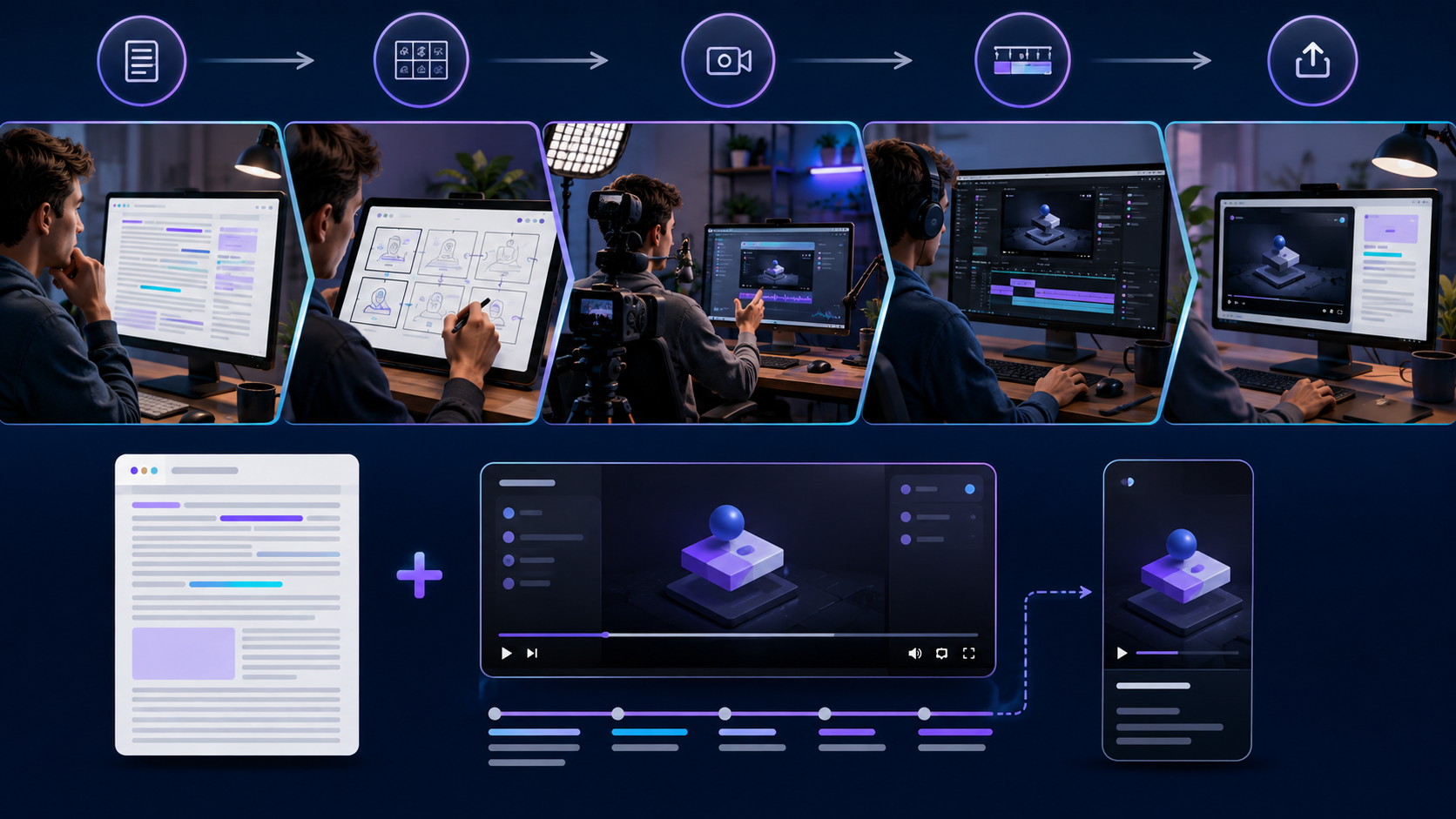
How to Turn an Academy Article into a Useful Tutorial Video
Video Tutorials
A written Academy article explains a subject at the reader's pace. A tutorial video can demonstrate the same idea through voice, screen movement, examples, and visual steps. The goal is not to read the article aloud. It is to adapt the strongest lesson into a viewing experience that makes the process easier to understand and complete.
Choose one practical outcome
Begin with the result the viewer should reach. A tutorial might show how to create a directory listing, prepare a product, organize receipts, or customize an AI prompt. If the article covers several large ideas, select one for the video or create a series.
A focused promise makes the tutorial easier to plan and helps the viewer decide whether it is relevant. The title, opening, demonstration, and closing action should all support the same outcome.
Convert the article into a video outline
Review the article and identify the essential sequence: the problem, preparation, main steps, common mistake, finished result, and next action. Remove background information that does not help the demonstration. Keep supporting details in the article and link viewers there for deeper reference.
Write the outline in spoken language. Sentences that read well on a page can sound formal when narrated. Use short phrases, transitions, and clear instructions.
Plan what viewers will see
For each segment, specify the visual: presenter, screen recording, product close-up, diagram, example, or title card. A storyboard can be simple. Its purpose is to prevent a long narration over an unrelated static screen.
When demonstrating software, prepare safe example data and remove private customer, financial, login, or account information. Increase interface zoom where necessary and move the pointer deliberately so viewers can follow the action.
Prepare a concise script
Open by confirming the problem and result. Briefly explain required materials or access, then guide the viewer through the process in order. Mention important limitations at the point where they matter. Close by reviewing the result and offering one relevant next step.
Do not fill the introduction with a long biography or promotion. Establish context quickly and earn attention through useful instruction. A short call to action at the end can invite the viewer to read the full guide, try the marketplace feature, or ask for related help.
Prioritize understandable audio
Clear audio often matters more than expensive video equipment. Record in a quiet space, position the microphone consistently, and listen for echo, background noise, or uneven volume. Speak at a natural pace and pause between steps so edits are easier.
Use music only when it supports the lesson and does not compete with narration. Confirm that music, images, clips, fonts, and other assets are properly licensed for the intended use.
Record with consistency
Use stable framing, sufficient light, and a clean workspace. For screen tutorials, capture the correct window size and disable distracting notifications. Record short sections rather than attempting a perfect uninterrupted performance.
Demonstrate the current workflow and label variations carefully. If a software interface changes, update the relevant portion or add a note instead of leaving viewers with instructions that no longer match.
Edit for learning
Remove long pauses, mistakes, repeated explanations, and unnecessary navigation. Add chapter breaks, close-ups, highlights, or simple callouts to direct attention. Include captions or a reviewed transcript to improve accessibility and help viewers who watch without sound.
Use readable contrast and keep visual effects restrained. The viewer should remember the process, not the transitions. Preview the final video on a phone as well as a desktop screen.
Create a short from the tutorial
A short or reel can extract one mistake, tip, before-and-after example, or quick result. Reframe the composition vertically and rewrite the opening for immediate context. Do not squeeze an entire tutorial into a few seconds; use the short to deliver one useful point and guide interested viewers to the complete lesson.
Publish the article and video together
Embed the tutorial in the related Academy article and activate the appropriate video indicator on the article card. Add a short summary, chapters when supported, and a relevant CTA. The article provides searchable detail while the video demonstrates the action; together they serve different learning preferences.
Tutorial production checklist
- Define one viewer outcome.
- Convert the article into a demonstration sequence.
- Prepare safe examples, visuals, and a spoken script.
- Record clear audio and stable, readable video.
- Edit for pace, captions, chapters, and accessibility.
- Create one focused vertical excerpt when useful.
- Embed the video with the article and test every link.
Teach, then invite the next step
A useful tutorial respects the viewer's time and makes progress visible. When the article supplies depth and the video supplies demonstration, Marketplace Academy becomes more than a collection of posts—it becomes a practical learning system that can educate users and introduce them naturally to relevant services.